Wondering what is a SCADA system and whether your plant needs one? It is software and hardware that collects live data from equipment, shows it to operators, and lets them send supervisory commands.
| Item | Value |
|---|---|
| NIST guide covering SCADA, Rev. 3 edition | SP 800-82 Rev. 3, published September 2023 |
| Title of that edition | Guide to Operational Technology (OT) Security |
| Requirements Rev. 3 says OT security must address | Performance, reliability and safety |
| Sectors CISA says ICS and OT underpin | Energy, Water and Wastewater, Transportation, Critical Manufacturing, Food and Agriculture, Nuclear, Chemical |
Figures come from NIST’s Rev. 3 page and CISA’s ICS page. They can change, so check the source before you rely on them.
This guide is part of our coverage of digital transformation in manufacturing.
What a SCADA system actually does
SCADA stands for Supervisory Control and Data Acquisition. The name describes two jobs: gathering data from machines and sensors, and giving people a supervisory layer from which to watch and adjust a process.
A SCADA system does not usually run the machine’s fast control loop itself. Local controllers do that work, while SCADA sits above them and gives a plant-wide or site-wide view.
In practice, SCADA typically handles four tasks:
- Reading values such as temperature, pressure, flow, level or motor status.
- Displaying those values on screens operators can understand.
- Raising alarms when a value leaves its safe range.
- Recording history so teams can review trends and investigate faults.
The main components of a SCADA system
Most SCADA architectures share the same building blocks, even though vendors name them differently. Understanding each layer makes it easier to read a vendor proposal or a network diagram.
- Field devices: sensors, meters, valves and drives that touch the physical process.
- Controllers: programmable logic controllers (PLCs) and remote terminal units (RTUs) that read the field devices and execute control logic.
- Communications: wired, radio, cellular or fibre links that carry data between sites and the control centre.
- SCADA server: the central software that polls controllers, stores data and manages alarms.
- HMI: the human-machine interface, the screens where operators view the process and issue commands.
- Historian: a time-series database that keeps process data for reporting and analysis.
The NIST guide to industrial control systems names SCADA systems, distributed control systems (DCS) and PLC-based configurations as the main system types it addresses, according to NIST’s SP 800-82 page, first published in June 2011.
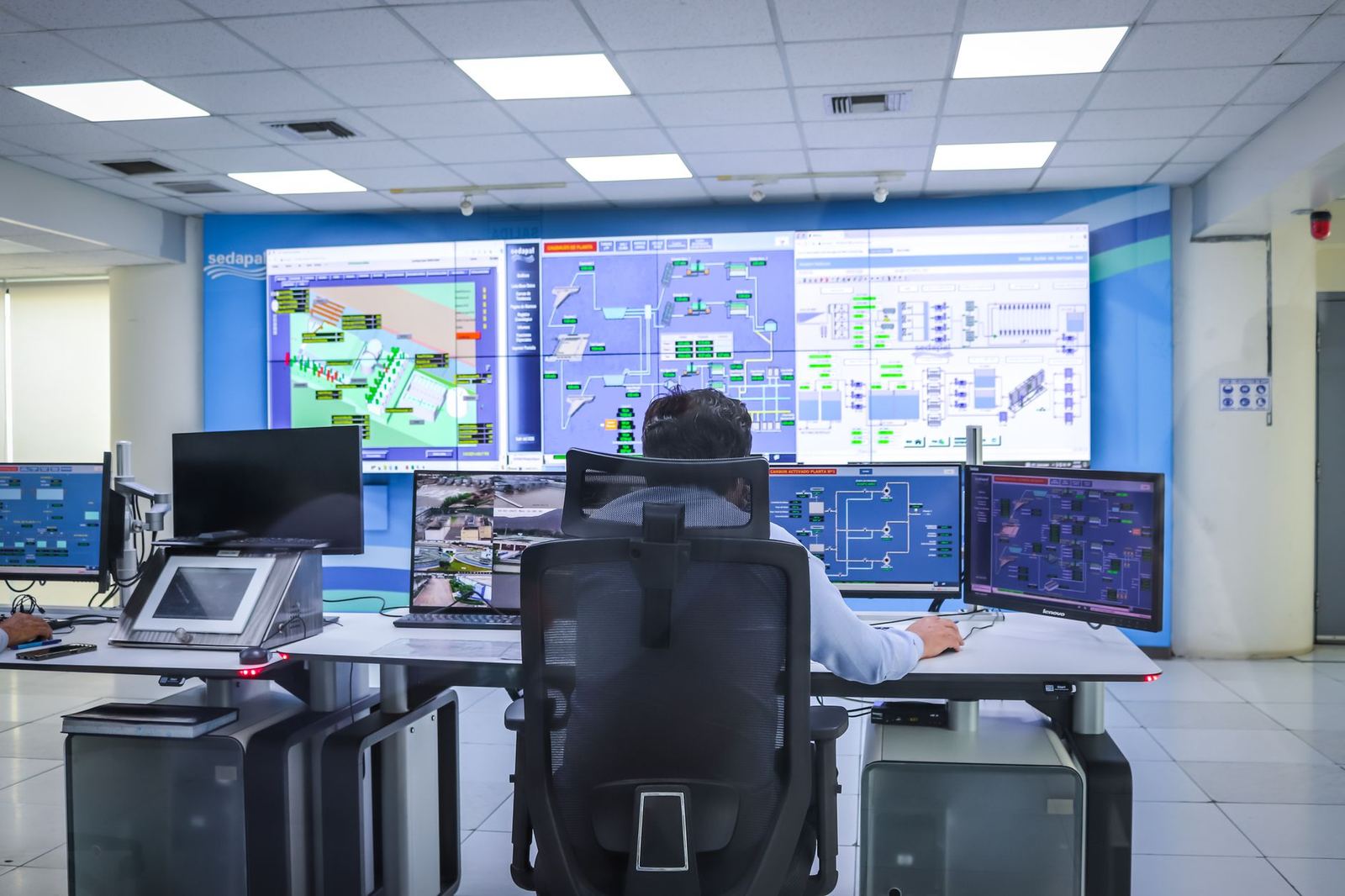
Data moves in a loop. A sensor measures a condition, a PLC or RTU converts it to a digital value, and the SCADA server polls that value over a network.
The server stores the value, updates the HMI and checks it against alarm limits. If an operator decides to act, a command travels back down the same path to the controller, which then moves a valve, starts a pump or changes a setpoint.
The supervisory command is usually a setpoint or a start-stop request, and the local controller carries it out. Safety and security planning therefore has to cover the whole path, not just the screens.
SCADA vs DCS vs PLC: how they differ
These terms overlap, and real plants often mix them. The simplest split is by scope and role.
- PLC: executes control logic for a single machine, cell or line, and is built for fast, repeatable scan cycles.
- DCS: coordinates continuous process control across one plant or site, often with controllers and operator stations designed as one package.
- SCADA: supervises and collects data from many controllers, often spread across several sites linked by wide-area communications.
Treat this as a rule of thumb rather than a standard. Modern platforms blur the lines, and a large plant may run a SCADA layer on top of PLCs and a DCS at the same time.
A useful question is geography. If the equipment sits in one building and needs tight, continuous control, a DCS or PLC network may be enough. If assets are scattered, such as pumping stations or remote tanks, a SCADA layer with telemetry is the more natural fit.
Another question is who uses the data. Operators need alarms and live screens, while engineers and managers need trends and reports, so the best SCADA setups serve both groups without cluttering the operator view.
Where SCADA is used
CISA states that ICS and OT are the foundation of U.S. critical infrastructure, listing Energy, Water and Wastewater Systems, Transportation Systems, Critical Manufacturing, Food and Agriculture, Nuclear Reactors, Materials, and Waste, and Chemical sectors on its industrial control systems page.
Typical examples include water treatment works, pipelines, electrical substations, food and beverage lines, and factory utilities such as compressed air or chilled water.
In manufacturing, SCADA often feeds higher-level tools. Production data can flow into planning software, which is where erp for manufacturing companies connects to the shop floor. It can also feed simulation models, as explained in our piece on what is a digital twin in manufacturing.
Benefits and limits of SCADA
The main benefit is visibility. Instead of walking the site to read gauges, teams see every monitored point in one place and are alerted the moment something drifts.
Other common benefits include:
- Faster response to faults, because alarms reach the right person quickly.
- Better records for audits, quality checks and root-cause work.
- Less manual rounds in remote or hazardous locations.
- A data source for energy tracking, maintenance planning and analytics.
The limits are just as real. Older SCADA installations can run outdated software, rely on legacy protocols, and be hard to change without stopping production.
Alarm floods are another common problem. If every minor deviation raises an alarm, operators learn to ignore them, so alarm rationalisation deserves as much attention as the screens themselves.
Security and planning considerations
Because SCADA links to physical equipment, a cyber incident can affect safety and output, not just data. NIST’s guide says it covers how to secure operational technology while addressing its unique performance, reliability, and safety requirements, in the Rev. 3 edition published September 2023 on its CSRC page.
Before buying or upgrading, work through these questions:
- Which processes must be monitored, and how fast must data refresh?
- Which existing PLCs, RTUs and protocols must the system talk to?
- How will the control network be separated from the office network?
- Who owns alarms, user accounts and software updates?
- How will data reach reporting, ERP or analytics tools?
This site is independent and educational. It does not sell SCADA products or offer consulting, and it is not affiliated with any vendor, agency or standards body named here.
Frequently asked questions
Is SCADA the same as an HMI?
Show answer
No. The HMI is the screen operators use. SCADA is the wider system that includes servers, communications, controllers and the HMI.
Does SCADA replace PLCs?
Show answer
No. PLCs run local control logic, and SCADA supervises many of them. Most SCADA systems depend on PLCs or RTUs underneath.
Is SCADA only for utilities?
Show answer
No. Utilities are a classic use, but factories, food plants and chemical sites also use SCADA to monitor and supervise equipment.
Which guidance covers SCADA security?
Show answer
NIST SP 800-82 Rev. 3, published September 2023, covers operational technology security, and SCADA is among its listed keywords on its CSRC page. Check that page for the current edition.